

Anthropic’s Claude Content Checker Tool Is Now Available—Here’s How to Use the Detector
Anthropic's Claude detector tool is here.
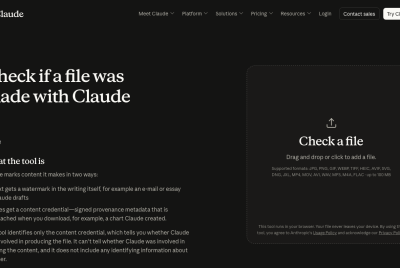
Anthropic has released a free tool that lets anyone check whether a file was made using Claude, giving users a straightforward way to verify AI involvement in a piece of content.
The tool arrives as part of a broader industry push toward transparency around AI-generated material, though it comes with a fairly significant limitation worth understanding before relying on it.
Anthropic Releases Content Checker Tool
The Content Checker is available now through Claude's website, letting anyone upload a file to see whether Anthropic's AI was involved in creating it.
According to Anthropic, the tool runs in your browser, meaning a user's file never leaves your device during the checking process and stays local rather than being uploaded to Anthropic's servers.
The tool works by reading what Anthropic calls a content credential, described as "signed provenance metadata that is attached when you download, for example, a chart Claude created."
When Claude produces a supported file type, it automatically attaches this credential as a small, cryptographically signed note embedded directly in the file's metadata, confirming the file was made or processed using Claude.
Claude AI Generation Detector Features
The biggest catch tied to this tool is what it actually confirms and what it does not. Anthropic states plainly that the checker "identifies only the content credential," and that it "can't tell whether Claude was involved in creating the content."
In other words, the tool verifies that a specific technical marker exists in a file, rather than analyzing the actual substance of the file to determine whether AI was used to generate it.
That distinction matters for anyone hoping to use the tool as a general AI detector. Since the checker only reads an embedded credential rather than scanning content itself, a file with the metadata stripped, converted, or otherwise altered could pass through undetected even if Claude was originally involved.
Anthropic also notes the tool "does not include any identifying information about the user," meaning it cannot reveal who created a flagged file, only that Claude was involved in producing it at some point.
How to Use the Content Checker Tool
Using the tool is straightforward. Anthropic's Content Checker supports a wide range of image formats, including PNG, JPG, WEBP, HEIC, TIFF, AVIF, SVG, and GIF, along with video and music files, with individual files supported up to 100MB in size.
Users simply need to upload a file directly through the browser-based interface, and Anthropic's tool checks it automatically without requiring any additional setup or account sign-in.
This checker functions differently from Anthropic's separate text watermarking system, which embeds invisible marks into Claude-generated text rather than file metadata.
According to Anthropic's help documentation, that text-based watermark detection remains in "private preview." It is currently limited to eligible organizations required to verify Claude's compliance under the EU AI Act, including regulators, law enforcement, fact-checkers, and certain enterprises.
Anthropic has said it plans to expand access to that separate detection system over time, though for now, the newly released Content Checker remains the company's only publicly available tool for verifying whether a specific file passed through Claude.
Originally published on Itech Post
© {{Year}} iTech Post All rights reserved. Do not reproduce without permission.